
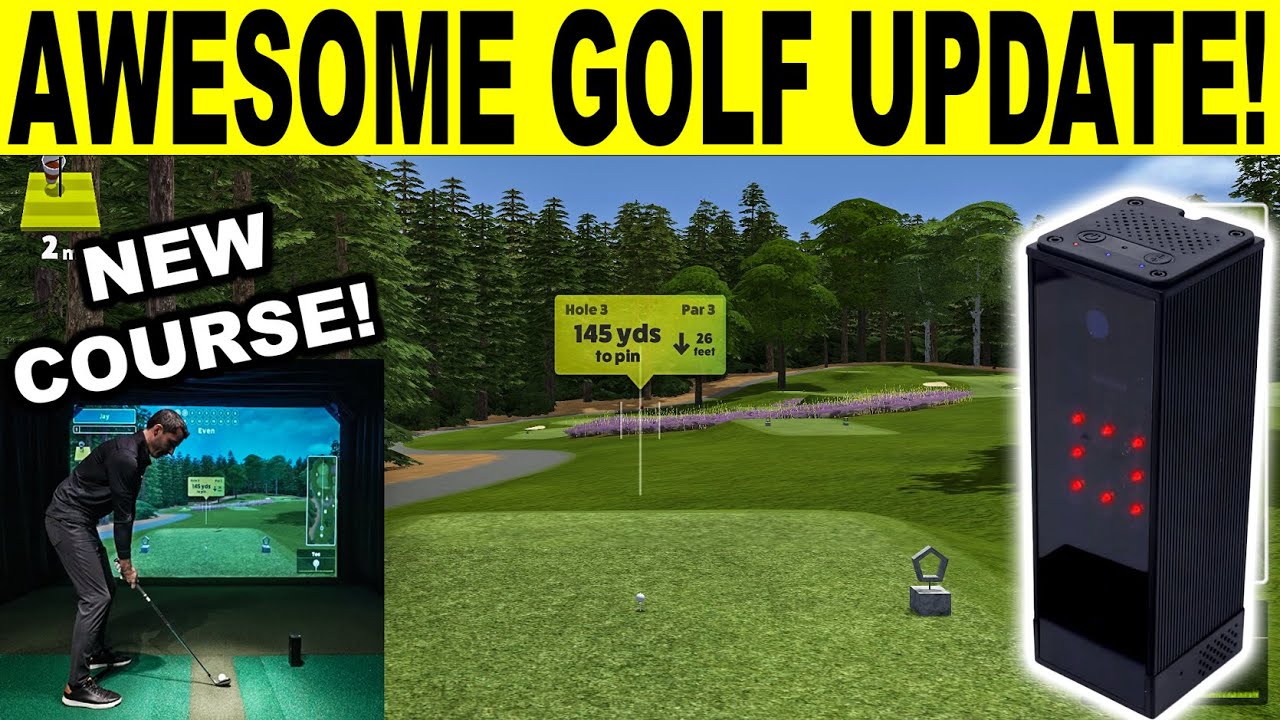
Awesome Golf Simulator Update! Review w/ Square Golf Launch Monitor!
What’s up everyone? Welcome back to Golf Simulator Videos. We’re back today with the awesome golf simulator software for another big update coming from these guys. We’re actually going to play with the Square Golf launch monitor. I’m going to show a few things I haven’t shown before with that, such as club data, and that’s because there’s a new update for the detail on the shot by shot out at the range. And then we’re also going to show I think it’s Sunnyale Heath is the name of it. Brand new 18hole course that they’ve released and it’s an interesting one too. So stay tuned. Now, if you’re looking to purchase a Square golf launch monitor, tons of conversations on this. Check out my link and discount code in the description and pinned to the top of the comments. That’s going to get you the lowest price. You’re going to be buying directly from Square. Helps support the channel, too. But let’s dive right in. We’re going to go to range first, and I want to show you these updates that they’ve done. So, you’re going to have a totally different look when you’re on this detail. Uh, basically looking at the swing plane detail. So, let’s just go ahead and select three hybrid. All right. And I haven’t really warmed up yet. I hit a couple shots just testing this out. You do have a club sticker that you put 20 cm above the ground when you’re at your normal loft. So if you were just holding your club like this, it’s pretty simple just to kind of measure roughly about 20 cm. So the club data I find to be reasonable. I don’t think that anybody’s going to be super misled. I haven’t been able to quite pinpoint, you know, how the accuracy is. I feel like there is some variance, but you’re talking about a $699, you know, unit before my discount code. I think that it is giving you a fairly good representation if you’re trying to work on, you know, being out to in to out. And so that’s what we’ll demonstrate. The first thing I’m going to try to do is I’ll try to be a little out to in on this shot with my three hybrid. [Music] That was a pretty good shot. You’re going to see that ball take a cut and you’re going to see that club path was left 4.7. Now, check out the totally different representation that you’re seeing down here at the bottom. So, this is this is totally different. I’ll actually take my camera down just for a second so you can see exactly what’s going on there. I don’t want to uh you guys not be able to see that. So you can see you’ve got vertical launch, dynamic loft, attack angle, spin, spin axis, uh horizontal launch, face uh face the path, and then club path all being represented graphically in a very unique way. So they’ve always tried to make this software fun, but also at the same time, uh it really is some good training software when you’re getting all this data, the way that it represents it and everything. Um you know, it’s pretty cool. So that was kind of an average hybrid for me. uh carry 220. That’s spoton. Um ball speed, everything I’m seeing there, you know, ball data wise. So, I am using a TP5X ball. That’s what’s nice. You can use that. It’s a I find it very comparable to my my Prov1 actually. I think that is Tailormaid’s basically their Prov1. All right. So, now let’s hit a normal shot. This is probably going to come a little from the inside. [Music] I don’t know if I closed that F. Yeah, I did. Okay. I just wanted to make sure I closed the face enough to get you a draw. Um, and look at the club path. So, it was actually right 7.8. I I can come inside heavily. Um, and you can see the face to path. I was right though. I didn’t quite close it enough. It was a tad towards the toe. Gave me a little bit of gear effect. And you can see that draw. But it’s a really cool different representation that they’ve done there. So, now what do I want to do? I want to go out and play a few holes on Sunningale Heath. Okay. All right. Let’s go ahead and exit out of here. I try not to make these videos a marathon. I want everybody to be able to see the updates. Um, you know, and not have to watch, you know, an hourong video. So, you now have nine-hole courses that you guys have seen before and now you have 18hole courses, which if you guys haven’t seen all these, check them out. So, you’ve got Sunnydale Heath, that new one I talked about, Bamp Springs, Mission Hills, a lot of great courses. I mean, look at Blue Monster, Wentworth. I mean, really, really nice courses that they’ve uh added. So, it’s one that people talk about. Now, let’s go ahead and go back for one second. And I actually need to take down my video again, uh, because I can’t quite show this. So, look, it’s a par 58. How interesting, right? So, uh, we’re going to go out and play a few holes, and I think they’re actually going to be par 3es. So, um, I’ll just select 18. You can play three, nine, 18, or you can just go in and select each individual one, and then you can just go through. One thing I think I’m going to recommend to them is I’d like kind of like a scorecard view. even if they just right here just kind of put like three, three, four, four, just so you knew what they were. But it is cool how you can go through and you can see the detail of each hole if you wanted to select certain holes. But let’s just go ahead. Um, pentagon’s fine. Not trying to, you know, play uh super long. And I think that the the course is a, you know, par three that gives you the opportunity to do whatever you want. If you wanted to just work on wedges, what’s cool is I would recommend going out and playing from uh the front TE’s and work on some wedge shots and then come back here and work on some iron approach shots. So, downhill 10 ft 168. I should be able to probably draw an eight iron and get it in there. I hope this is the right play. I think that seven might be too much. So, let’s go ahead and give that a shot. So, I don’t have these clubs stickered up. All right. I just uh stickered up the three hybrid for you. That way you can see that. See if we can get a eight iron down there that far. Tried to tug it as hard as I could. You can see the ball go a little bit left. I just think that’s the right play. I think seven was too much. That was pretty good. I’ll I’ll take that. So, I like the details. See the houses in the background and everything. So, that’s my two putt zone. There’s no putting in awesome golf. I’ve had people ask that before. Um, you know, it’s just not not something they do. I think it started with Flight Scope. Um, and even though Flight Scope has putting, um, you know, Garmin R10, for instance, doesn’t have putting and, uh, you don’t have to worry about it. But yeah, that’s what they do. I don’t know if they’ll ever add it. I’ll have to ask them that. But you guys let me know if that’s something you’d really want to see is putting or not. Um, and I’ll ask him if that’s something that would come. So, what is this? 167, but it’s uphill 3.8. So, I mean, technically maybe I could hit an eight, but let’s go ahead and try to hit something different here. I’ve already shown you guys some shot shaping. Let’s see if we can hit like a soft cut seven in there. This is a shot I have a very difficult time executing, but we’ll at least try. I don’t know if I held that off enough to cut. It’s cutting. Yeah, I hit it a little heavy. So, I swung soft and hit a little heavy and I’ll be able to show you guys chipping. So, it actually kind of works out. So, if I uh would have crisped that a little better and not tried to, you know, hit such a a soft cut in there, um got a little more aggressive with it and didn’t hit it heavy, it probably would have worked out really well. All right, so 20 yards. All right, it’s not bad. Let’s see if we can get that in the gimme zone. 20 yards. Hopefully that’s not too much. Stop. Stop. Oh, it hit the pin and almost dropped. Oh my gosh, that was a riot. That’s awesome. Almost a hole out. That would have been cool. That would have been really cool. So, you can see mainly par 3es and a couple par fours sneaking in there. Um, fun course though. Look at the elevation and everything. Um, keep in mind a lot of people comment on the graphics on Awesome Golf. Their goal is to make this accessible to a huge crowd. They want people to be able to play on phones and iPads that don’t have the latest M chip or, you know, graphic uh card inside their computer that costs $3,000. I mean, they don’t want that. So, if you look at the minimum specs, it’s actually very low. And so, that’s why they don’t want to overdo the graphics, you know, to limit the availability to everybody out there, basically. So, all right. So, I’m looking at this and I I grabbed a pitching wedge. I I think that if we hit uh a full pitching wedge, I’m I’m learning this. I’ve been talking to my swing coach and like you saw me hit that cut shot and that’s just not my shot. My swing doesn’t adapt well to that. And uh I tend to catch him heavy. I mean, the contact on that ball wasn’t that good. I mean, it was a really poor shot, honestly. And then if I hit full shots, rather than trying to squeeze a nine iron down there, I’m going to hit a full pitching wedge. I can get big distance out of out of a draw. So, let’s see if we can do it. I mean, such better contact. Big high draw. I mean, heck, it’s it might be too much. Look at that. It’s going to bounce off the back. We’re going to have to show you chipping again, which is cool. I mean, I’m glad that we get to uh I swung really hard at that. And you can see, I mean, it was just great data all around. The downhill got me. I probably should have thought a little more about that, how far downhill it was. Um, and then now we have a little sensitive 14 yard chip. So, it’s good to be able to show you guys chipping. Um, 14 yards. Just trying to think of where this needs to land. 14. Little left of target, I think. Yeah, not bad. A bit hit and rolled. That’s one thing that I I’ve always been interested in. You can see how that ball kind of started just a tad left of target and then hit and kind of rolled just a little bit right. um is that you don’t see a lot of the undulation. Um and I don’t think they have like a heat map they put on. I haven’t dove in a lot to those details on Awesome Golf. But um really cool course. I mean, I think that this is another great ad that people are going to have a lot of fun with. Sorry about that. I actually had to restart the video uh because my microphone I didn’t realize that it died there at the end. I was worried I lost it for the whole video, but I checked and I didn’t. So, I figured I’d wrap things up. But what I was saying is is really cool par4 coming up. Um I think this is a fun course. Another great ad for, you know, someone out there that just wants to play different, you know, wedges and irons. And like I said, I think you should adjust the tea boxes. Um I also think that it’s really cool that they’re showing that different type of graphical representation on the club data. Let me know what you think on that. I’ll be diving in more. But as always guys, make sure that you shoot me an email if you have any questions. If I can help in any way. I always put that in the description and pinned to the top of the comments as well. I appreciate you guys watching and make sure you stay tuned because guess what’s coming up soon? We’ll be heading to the PGA merchandise show down in Orlando. Got a lot of great content coming up in January, but stay tuned in the meantime and we’ll talk to you soon.
In this video we review the new Awesome Golf Simulator December 2025 Update using the Square Golf Launch Monitor. This update brings a new course and shot details! Buy the Square Golf Launch Monitor using my link & discount code below for the best price!
Exclusive Discount Code: GSVSQUARE
https://3d47a8-a6.myshopify.com/?ref=GSVSQUARE
In the UK / Europe: https://simspacegolf.com/?ref=mfcwmqlg
Discount Code: SQUAREGSV
Awesome Golf Simulator December 2025 Update Details:
3.9.0
New Course Added!
Added the Sunningdale Heath course to our Virtual Golf lineup as well as for Closest to the Pin!
Added swing plane views to Shot-by-Shot detail mode.
Added groupings to Shot-by-Shot map view
Interactable ball markers / table rows in SBS Detail will replay shots when selected.
A few bug fixes.
More about the Square Golf Launch Monitor:
This state-of-the-art Square Golf HE Launch Monitor is a must-have for any golfer looking to improve their game. With precise data and analysis on all aspects of golf practice, this device will help golfers of all levels reach their full potential on the course. Say goodbye to guesswork and hello to measurable results with the Square Golf Launch Monitor.
Realistic Practice Anytime, Anywhere
Transform your home golf studio with Square Golf. Play realistic 3D courses, get accurate feedback, and enjoy versatile practice modes on mobile and PC.
Perfect for golfers of all levels, Square Golf brings the full golfing experience to your fingertips. Using a high-speed 3D vision camera to measure ball & club data.
Easy to setup, simply turn the device on, log into your Square Golf account, find your device and start swinging.
The Square Golf Launch Monitor package includes the following components:
Launch Monitor: The main device that captures data.
Battery: A replaceable lithium-ion battery that powers the device.
Power Cable (USB A-to-C): For charging the battery.
Club Marker: Attaches to the golf club for measuring swing path and attack angle.
Remote Control: For easy operation of the launch monitor.
Patterned Golf Balls (3 EA): Used to measure spin data accurately.
Welcome Credit Card: Likely contains setup information and support contacts.
Swing Stick & Safety Strap: Used for virtual shots when not hitting an actual golf ball.
The Square Golf Launch Monitor can measure the following shot data:
Speed: 3.4 to 201.3 mph (for shots) and 1.1 to 17.9 mph (for putting)
Direction: -15.0° to 15.0°
Elevation: -10.0° to 70.0°
Back Spin: -2,000 to 12,000 rpm
Side Spin: -7,000 to 7,000 rpm
Path Angle: -30.0° to 30.0°
Attack Angle: -30.0° to 20.0°
Using a patterned golf ball and club marker can enhance the accuracy of these measurements. For virtual shots, the data is estimated based on the swing stick’s speed, path, and face angle.
Chapters
00:00 Awesome Golf Update
00:41 Range Detail Club Data Update
03:21 New Course Update Review
09:47 Final Thoughts



2 Comments
Buy the Square Golf Launch Monitor using my link & discount code below for the best price!
Exclusive Discount Code: GSVSQUARE
https://3d47a8-a6.myshopify.com/?ref=GSVSQUARE
In the UK / Europe: https://simspacegolf.com/?ref=mfcwmqlg
Discount Code: SQUAREGSV
I wish they added putting for square users